Loading...

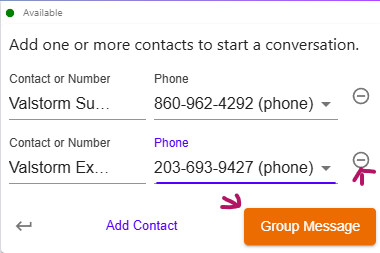
Group Conversations are made on the "Texts" tab in ValPhone. This allows you to send messages to multiple contacts at once, making it easy to communicate with groups without needing to create separate conversations for each contact. To create a group text in ValPhone, follow these steps:
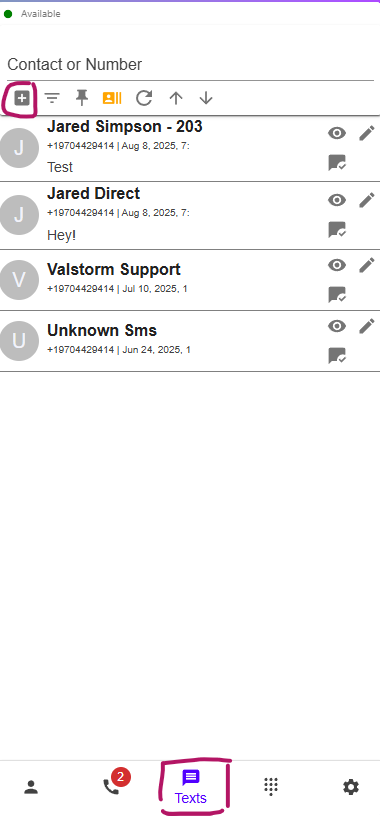
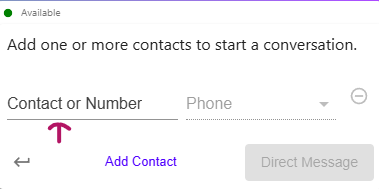
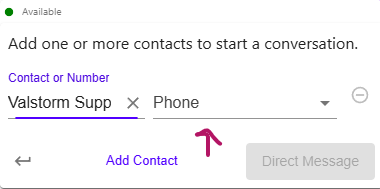
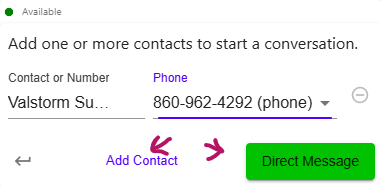
Use text templates while inside a conversation in the web app. Click the template icon to open the templates menu. From there, you can select a template to insert it into the message input field. You can then customize the message as needed before sending it.
Text Templates can include variables that will be replaced with actual values when the template is used. These variables are known as Merge Fields. You can use the following Merge Fields in your Text Templates:
{contact.first_name}: The first name of the contact.{contact.last_name}: The last name of the contact.{contact.name}: The full name of the contact.{contact.phone}: The phone number of the contact.{contact.email}: The email address of the contact.As you can see, the formula is {object.field_name} where object is the type of object (e.g., contact, lead, deal) and field_name is the name of the field you want to include written in snake_case (i.e., all lowercase with underscores between words).